Wednesday, 23 October 2019

Open a webpage using the urllib library.


Programming steps:
1. Open the python script mode and type below  statements


import urllib.request
data = urllib.request.urlopen('https://www.youtube.com/')
print(data.read())


Output:

Python 3.8.0 (tags/v3.8.0:fa919fd, Oct 14 2019, 19:21:23) [MSC v.1916 32 bit (Intel)] on win32
Type "help", "copyright", "credits" or "license()" for more information.
>>>
== RESTART: C:/Users/kvhebbal/AppData/Local/Programs/Python/Python38-32/gbh.py =

squeezed text(180 lines).

Tuesday, 22 October 2019

Write a Django based web server to parse a user request (POST), and write it to a CSV file


Programming steps(Reference)


1. O.S windows 64bit
2. Internet connection compulsory
3. python 64 bit

4. open cmd prompt
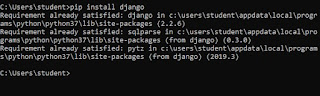
  pip install django

5. open windows drive d
   create folder dj

6. open cmd prompt
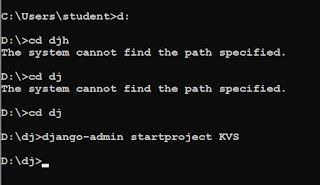
   d:
   cd dj
   django-admin startproject KVS     #open windows drive d and dj folder check KVS folder creation
   cd KVS                                           # inner folder and outer folder and it creates python files
   manage.py runserver
   copy the starting development server ip address: http://127.0.0.1:800/ and paste in the webpage
   In the command prompt press ctrl+c
   manage.py startapp teacher

7. open windows drive d wid Django folder
   -open  outer and inner KVS folder
    - open setting file with IDLE
     coding
            installed_apps add teacher at the last
            go to the template and include in dirs template

8. open note pad and type html code in the file first.html and save it in the folder
D:\Django\KVS\temp    # Get method
<html>
 <head><title>Welcome to KVS</title></head>
  <body bgcolor=skyblue>
      <h1> This is first Django Project.</h1>
           {{even}}
     
        {% for a in even %}
          {{a}}
           <br>
        {% endfor %}
 
    {{name}}
 
    <a href="http://127.0.0.1:8000/stuentry">
     <h1>Click Here to add new student.</h1>
     </a>
  </body>
</html>

9. open note pad and type html code in the file stuentry.html and save it in the folder
D:\dj\KVS\temp  # post method
<html>
 <head><title>Student entry form</title></head>
  <body bgcolor=skyblue>
     <h1>Enter the details</h1>

     <form action="#" method="POST">
         {%csrf_token%}
         Roll: &nbsp <input type="text" name="roll no"> <br><br>
         Name: &nbsp <input type="text" name="name"> <br><br>
         <input type="submit"> <br><br>
      </form>
      <a href="http://127.0.0.1:8000/first">
         <h1>Click Here to view th details of students.
         </h1>
      </a1>
   </body>
</html>

10.create excel and save it as "stud.csv" and put some entry
e.g.,
roll,name
1,Hari
2,Mukesh

11.In dj\KVS, go to teachers folder and edit views.py in IDLE
from django.shortcuts import render
import pandas as pd
from django.http import HttpResponseRedirect
import csv

# Create your views here.
 def show(request):
     lst=[x for x in range(2,20,2)]
     df=pd.read_csv("D:\\dj\\stud.csv")
     return render(request,'first.html',{"even":lst,"name":df})
 def stuentry(request,):
     if request.method=='POST':
         stu_dict=request.POST
         with open("D:\\dj\\stud.csv","a") as st:
             Val=csv.writer(st)
             L=[]
             for x in stu_dict:
                 if x=="rollno":
                     L.append(stu_dict[x])
                 if x=="name":
                     L.append(stu_dict[x])
             Val.writerow(L)
     return render(request,'stuentry.html')

12.Now go to KVS folder inside of KVS. Edit urls.py with IDLE
from django.contrib import admin
from django.urls import path
from teacher import views

urlpatterns = [
    path('admin/', admin.site.urls),
    path('first',view.show),
    path('stuentry',views.stuentry),
    ]

13.open cmd prompt
   -manage.py runserver
   -copy server address (e.g., http://127.0.0.1:8000/)

14.open web browser and paste the address with "first" (i.e., http://127.0.0.1:8000/first)

Now you have your web with GET and POST method


Monday, 21 October 2019

Write a algorithm and python function program to find minimum and maximum in a list without using built in function min() and max() through looping :

#user defined function
def max_min(n):
    ls=[]
    for i in range(n):
        nu=int(input("enter the number"))
        ls.append(nu)
    print(ls)
    l=ls[0]
    for j in range(n):
        if(ls[j]>l):
            l=ls[j]
    print("larger=",l)

    s=ls[0]
    for j in range(n):
        if(ls[j]<s):
            s=ls[j]
    print("smaller=",s)


#main program
n=int(input("Enter the size of the list="))
max_min(n)


output
Enter the size of the list=4
enter the number6
enter the number8
enter the number2
enter the number3
[6, 8, 2, 3]
larger= 8
smaller= 2

Friday, 18 October 2019

Integrate SQL with Python by importing the MySQL module


Programming steps (Reference):

1. Operating system: windows 64 bit
2. Python: 64 bit
3. Mysql:  64 bit           # open parallely cmd prompt, python window &  mysql prompt

4. open cmd prompt
    pip install mysql-connector   Enter
    pip install mysqlclient              Enter

5. python interactive mode
   >> import mysql.connector     Enter
 Ans: >>


6.   open mysql cmd prompt
     Enter password: root
     select current_user;

7. open python script mode
     import mysql.connector
     mydb=mysql.connector.connect(host="localhost",user="root",passwd="root")
     print(mydb)

8.  open mysql cmd prompt
      show databases;
      drop database school;   ( if existing)
      show databases;

9. open python script mode   # creating school database logic
    import mysql.connector
    mydb=mysql.connector.connect(host="localhost",user="root",passwd="root")

    mycursor=mydb.cursor();
    mycursor.execute("create database school ")

10.  open mysql cmd prompt     # printing database mysql python
       use school;
      show databases; 

11. open python script mode      # printing database through python
    import mysql.connector
    mydb=mysql.connector.connect(host="localhost",user="root".passwd="root")

    mycursor=mydb.cursor();
    mycursor.execute("show databases")
    for x in mycursor:
           print(x)

 13.open python script mode
import mysql.connector
mydb=mysql.connector.connect(host="localhost",user="root",passwd="root",database="school")

mycursor=mydb.cursor();
mycursor.execute("CREATE TABLE student1920(Roll int(2) Primary key, Name char(20), class int(2), DOB Date, Gender Char(1), City Char(10), Marks int(3))")

14.  open mysql cmd prompt
    use school;
    desc student1920;

15. open python script mode
import mysql.connector
mydb=mysql.connector.connect(host="localhost",user="root".passwd="root",database="school")

mycursor=mydb.cursor();
mycursor.execute("show tables")
for x in mycursor:
           print(x)

16. open python script mode
import mysql.connector
mydb=mysql.connector.connect(host="localhost",user="root".passwd="root",database="school")

mycursor=mydb.cursor();
sql="insert into student1920(Roll,Name,class,DOB,Gender,City,Marks) values (%s,%s,%s,%s,%s,%s,%s) "
val=(01,"Nanda",10,1995/06/06,"M","Agra",551)
mycursor.execute(sql,val)
mydb.commit()
print(mycursor.rowcount,"1 Record inserted")

17.  open python script mode   #Repeat all the steps remaining rows change the data
import mysql.connector
mydb=mysql.connector.connect(host="localhost",user="root".passwd="root",database="school")

mycursor=mydb.cursor();
sql="insert into student1920(Roll,Name,class,DOB,Gender,City,Marks) values (%s,%s,%s,%s,%s,%s,%s) "
val=(02,"Saurabh",12,1993/05/07,"M","Mumbai",462)
mycursor.execute(sql,val)
mydb.commit()
print(mycursor.rowcount,"1 Record inserted")

.
.
18.open mysql cmd prompt
  select * from student1920;

19.open python script mode
import mysql.connector
mydb=mysql.connector.connect(host="localhost",user="root".passwd="root",database="school")

mycursor=mydb.cursor();
mycursor.execute("select * from student")
myresult=mycursor.fetchall()
for x in myresult:
     print(x)


# questions
1. SELECT COUNT(*), CITY FROM STUDENT1920 GROUP BY CITY HAVING COUNT(*)>1;

#open python script mode

import mysql.connector
mydb=mysql.connector.connect(host="localhost",user="root".passwd="root",database="school")

mycursor=mydb.cursor();
mycursor.execute(" SELECT COUNT(*), CITY FROM STUDENT1920 GROUP BY CITY HAVING COUNT(*)>1")
myresult=mycursor.fetchall()
for x in myresult:
     print(x)

2. SLECT MAX(DOB), MIN(DOB) FROM STUDENT1920;

#open python script mode

import mysql.connector
mydb=mysql.connector.connect(host="localhost",user="root".passwd="root",database="school")

mycursor=mydb.cursor();
mycursor.execute("SLECT MAX(DOB), MIN(DOB) FROM STUDENT1920;")
myresult=mycursor.fetchall()
for x in myresult:
     print(x)


3. SELECT NAME,GENDER FROM STUDENT1920 WHERE CITY=''DELHI";
#open python script mode

import mysql.connector
mydb=mysql.connector.connect(host="localhost",user="root".passwd="root",database="school")

mycursor=mydb.cursor();
mycursor.execute("SELECT NAME,GENDER FROM STUDENT1920 WHERE CITY=''DELHI"")
myresult=mycursor.fetchall()
for x in myresult:
     print(x)


                                                                 ***End***


Friday, 20 September 2019

Write a program to calculate Simple interest and Compound interest using Loop conditioning

def SI(x):
    print("SI")
    for i in range(1,x+1):
        P=int(input("ENTER P VALUE "))
        R=int(input("ENTER R VALUE "))
        T=int(input("ENTER T "))
        Si=(P*R*T)/100
        print("SI = ",Si)

def CI(x):
    print("CI")
    for i in range (1,x+1):
        P=int(input("ENTER P VALUE "))
        R=int(input("ENTER R VALUE "))
        n=int(input("ENTER n "))
        Ci=P*(1+(R/100))**n
        print("CI",Ci)
#MAIN PROGRAM
x=int(input("ENTER X VALUE ="))
print(x)
ch=int(input("ENTER A CHOICE"))
if ch==1:
    SI(x) #calling function simple interest
elif ch==2:
    CI(x) #calling function compound interest

Tuesday, 17 September 2019

12th Networking


What is traceroute?
Traceroute is a widely used command line utility available in almost all operating systems. It shows you the complete route to a destination address. It also shows the time taken (or delays) between intermediate routers. Isn’t it great? Below is an example on Windows operating System.


ping  

Ping is a basic Internet program that allows a user to verify that a particular IP address exists and can accept requests.

ipconfig

Ipconfig (sometimes written as IPCONFIG) is a command line tool used to control the network connections on Windows NT/2000/XP machines. There are three main commands: "all", "release", and "renew". Ipconfig displays all current TCP/IP network configuration values and refreshes Dynamic Host Configuration Protocol (DHCP) and Domain Name System (DNS) settings. Used without parameters, ipconfig displays the IP addresssubnet mask, and default gateway for all adapters.

nslookup

nslookup is the name of a program that lets an Internet server administrator or any computer user enter a host name (for example, "whatis.com") and find out the corresponding IP address or domain name system (DNS) record. The user can also enter a command for it to do a reverse DNS lookup and find the host name for an IP address that is specified.


Python program to print all the numbersdivisible by 3 and 5 for a given number

# Python program to print all the numbers
# divisible by 3 and 5 for a given number
  
# Result function with N
def result(N):
      
    # iterate from 0 to N
    for num in range(N):           
            # Short-circuit operator is used 
            if num % 3 == 0 and num % 5 == 0:
                print(str(num) + " ", end = "")


#main program
N = 100
  
# Calling function
result(N)